websocket_easy: comunicación sencilla entre una app de Android y un ordenador o una Raspberry Pi
Este artículo describe una práctica app de Android, con botones, para comunicarse con otro dispositivo (un ordenador o una Raspberry Pi) mediante websocket. El websocket es un protocolo de comunicación descrito aquí: https://en.wikipedia.org/wiki/WebSocket Lo…
https://www.electronics-engineering.com/es/websocket_easy-easy-comunication-between-android-app-and-computer-or-raspeberry-pi/
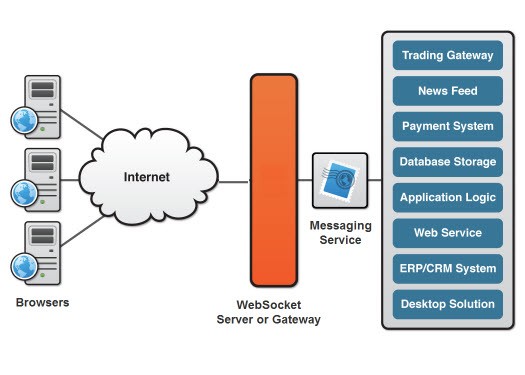
Este artículo describe una práctica app de Android, con botones, para comunicarse con otro dispositivo (un ordenador o una Raspberry Pi) mediante websocket.
El websocket es un protocolo de comunicación descrito aquí: https://en.wikipedia.org/wiki/WebSocket
La app Android completa está disponible aquí: https://gitlab.com/iptv-updated/websocket_easy
Esta app usa la biblioteca OkHttp descrita aquí:
https://medium.com/@ssaurel/learn-to-use-websockets-on-android-with-okhttp-ba5f00aea988
La interfaz de la app (creada con Android Studio) define los eventos necesarios para enviar los mensajes por la red con websocket. Las flechas sirven para enviar los comandos “arriba”, “abajo”, “izquierda” y “derecha”, y los demás botones envían indicadores y valores al servidor. Los botones “Loop” y “Stop-Loop” activan y desactivan un hilo del lado del servidor.

Este cliente puede probarse fácilmente con el siguiente servidor desarrollado en Python:
https://github.com/Pithikos/python-websocket-server
antes de ejecutar el servidor hay que cambiar el nombre del host a 0.0.0.0 (en lugar de 127.0.0.1) para permitir la comunicación con todos los clientes de la red local
aquí el vídeo:

el servidor también puede estar en una Raspberry Pi: esto es posible usando Python con la biblioteca “Tornado”.
Después se creó un circuito sencillo en la Raspberry Pi, con LED y resistencias conectados a los GPIO. Los LED reciben acciones según el botón pulsado en la app de Android.
[embedyt] https://www.youtube.com/watch?v=pxZu40eGSn0[/embedyt]
Código para ejecutar en la Raspberry Pi:
import tornado.httpserver
import tornado.ioloop
import tornado.options
import tornado.web
import tornado.websocket
import time
import RPi.GPIO as GPIO
import threading
import subprocess, os
import signal


GPIO.setmode(GPIO.BOARD)
#GPIO.setwarnings(False)
GPIO_sw = 7   #29  # pin 18
GPIO_out = 37
GPIO.setup(GPIO_sw,GPIO.IN,pull_up_down=GPIO.PUD_DOWN)
GPIO.setup(GPIO_out,GPIO.OUT)


#global Dead
#Dead = False
GPIO.setmode(GPIO.BOARD)
GPIO.setup(31, GPIO.OUT)
GPIO.setup(33, GPIO.OUT)
GPIO.setup(35, GPIO.OUT)
GPIO.setup(29, GPIO.OUT)
GPIO.output(31,False)
GPIO.output(33,False)
GPIO.output(35,False)
GPIO.output(29,False)

class LedHandler(tornado.websocket.WebSocketHandler):

    def loop(self):
        global Dead
        while (not Dead):
            #print "Motor On"
            GPIO.output(31,True)
            GPIO.output(33,False)
            GPIO.output(35,False)
	    GPIO.output(29,False)
            time.sleep(0.2)
            GPIO.output(31,False)
            GPIO.output(33,True)
            GPIO.output(35,False)
            GPIO.output(29,False)
            time.sleep(0.2)
            GPIO.output(31,False)
            GPIO.output(33,False)
            GPIO.output(35,True)
	    GPIO.output(29,False)
            time.sleep(0.2)
            GPIO.output(31,False)
            GPIO.output(33,False)
            GPIO.output(35,False)
            GPIO.output(29,True)
            time.sleep(0.2)
	if Dead == True:
	    GPIO.output(29,False)
    def check_origin(self, origin):
            return True

    def open(self):
        global channelValue
        global volumeLevel
        print "Connection opened from: {}".format(self.request.remote_ip)
        self.write_message("Connection opened")

    def on_close(self):
        print "Connection closed"

    def on_message(self, message):
        global Dead
	global volumeLevel
        global channelValue
	global channelAddress
	global run
        global io_loop
        global server

	if run ==1:
        	currentState = GPIO.input(31)
        	print "Message received {}".format(message)
		if (message[0] == "{"):
			indexComma = message.find(":")
			typeVal=message[1:indexComma]
			indexClose = message.find("}")
			value = message[indexComma+1:indexClose]
			#print(typeVal)
			#print(value)
                        if (typeVal == "volume" ):
				volumeLevel = value
				cmd = subprocess.Popen("sudo mpc volume " + str(value), shell=True,stdout=subprocess.PIPE)
                                stations = cmd.stdout.readlines()
			elif (typeVal == "channel" ):
				channelValue = value
                                cmd = subprocess.Popen("sudo mpc play " + str(value), shell=True,stdout=subprocess.PIPE)
                                stations = cmd.stdout.readlines()
				channelAddress = ""
			elif (typeVal == "radio"):
				cmd = subprocess.Popen("sudo mpc clear ", shell=True,stdout=subprocess.PIPE)
                                stations = cmd.stdout.readlines()
				cmd = subprocess.Popen("sudo mpc add " + str(value), shell=True,stdout=subprocess.PIPE)
                                stations = cmd.stdout.readlines()
				cmd = subprocess.Popen("sudo mpc play ", shell=True,stdout=subprocess.PIPE)
                                stations = cmd.stdout.readlines()
				channelAddress = str(value)
		if message == "default":
			cmd = subprocess.Popen("sudo /home/pi/pythonexample/playlist.sh", shell=True,stdout=subprocess.PIPE)
                        stations = cmd.stdout.readlines()
                        cmd = subprocess.Popen("sudo mpc play " + str(channelValue), shell=True,stdout=subprocess.PIPE)
                        stations = cmd.stdout.readlines()

        	elif message == "ledon":
	    		if currentState == True:
                		self.write_message("LED is already OFF")
            		else:
                		GPIO.output(31, True)
                		GPIO.output(33, True)
                		GPIO.output(35, True)
				GPIO.output(29, True)
        	elif message == "ledoff":
            		if currentState == False:
                		self.write_message("LED is already OFF")
            		else:
                		GPIO.output(31, False)
                		GPIO.output(33, False)
                		GPIO.output(35, False)
				GPIO.output(29, False)
        	elif message == "stoploop":
            		Dead = True
        	elif message == "loop":
            		if Dead == True:
	    			Dead = False
            			our_thread = threading.Thread(target=self.loop)
            			our_thread.start()
        	elif message == "ledlefton":
            		GPIO.output(31,False)
            		GPIO.output(35,True)
            		#if channelValue > 1:
			#	channelValue = channelValue - 1
                	#	cmd = subprocess.Popen("sudo mpc play " + str(channelValue), shell=True,stdout=subprocess.PIPE)
                	#	stations = cmd.stdout.readlines()
        	elif message == "ledleftoff":
            		GPIO.output(35, False)
        	elif message == "ledrighton":
            		GPIO.output(35, False)
            		GPIO.output(31,True)
            		#if channelValue < 5:
            		#	channelValue = channelValue + 1
                	#	cmd = subprocess.Popen("sudo mpc play " + str(channelValue), shell=True,stdout=subprocess.PIPE)
                	#	stations = cmd.stdout.readlines()
        	elif message == "ledrightoff":
            		GPIO.output(31, False)
        	elif message == "ledupon":
            		GPIO.output(29, False)
            		GPIO.output(33,True)
	    		#if volumeLevel < 100: # volumeLevel = volumeLevel +10 # cmd = subprocess.Popen("sudo mpc volume " + str(volumeLevel), shell=True,stdout=subprocess.PIPE) # stations = cmd.stdout.readlines() elif message == "ledupoff": GPIO.output(33, False) elif message == "leddownon": GPIO.output(29, True) GPIO.output(33, False) #if volumeLevel > 0:
			#	volumeLevel = volumeLevel-5
                	#	cmd = subprocess.Popen("sudo mpc volume " + str(volumeLevel), shell=True,stdout=subprocess.PIPE)
                	#	stations = cmd.stdout.readlines()
        	elif message == "leddownoff":
            		GPIO.output(29, False)
	if message == "radiooff" and run==1:
		print "  Stopped "
		GPIO.output(GPIO_out,False)
		run = 0
		cmd = subprocess.Popen("sudo mpc stop", shell=True,stdout=subprocess.PIPE)
		stations = cmd.stdout.readlines()
		#server.stop()
		#io_loop.stop()
        elif message == "radioon" and run==0:
        	print "  Started"
        	GPIO.output(GPIO_out,True)
        	cmd = subprocess.Popen("sudo mpc volume "  + str(volumeLevel), shell=True,stdout=subprocess.PIPE)
        	stations = cmd.stdout.readlines()
        	cmd = subprocess.Popen("sudo mpc play "  + str(channelValue), shell=True,stdout=subprocess.PIPE)
        	stations = cmd.stdout.readlines()
        	run = 1
        	#our_thread = threading.Thread(target=socketloop)
        	#our_thread.start()


def socketloop():
	global io_loop
	global server
	try:
		tornado.options.parse_command_line()
		app = tornado.web.Application(handlers=[(r"/", LedHandler)])
        	server = tornado.httpserver.HTTPServer(app)
        	server.listen(8000)
		io_loop = tornado.ioloop.IOLoop.instance()
		io_loop.start()
	except RuntimeError:
		print("server already on")

if __name__ == "__main__":
	global io_loop
	global server
        global volumeLevel
        global channelValue
	global channelAddress
	global run
	global Dead
	volumeLevel=90
	channelAddress = ""
	channelValue=1
	GPIO.output(GPIO_out,True)
        time.sleep(0.5)
        GPIO.output(GPIO_out,False)
        #our_thread = threading.Thread(target=socketloop)
        #our_thread.start()
	Dead = True
	try:
		run = 0
		while True :
			#print GPIO.input(GPIO_sw)
			if GPIO.input(GPIO_sw)==True and run == 0:
         			print channelAddress
				print "  Started"
	 			GPIO.output(GPIO_out,True)
				cmd = subprocess.Popen("sudo /home/pi/pythonexample/playlist.sh", shell=True,stdout=subprocess.PIPE)
                        	stations = cmd.stdout.readlines()
				cmd = subprocess.Popen("sudo mpc volume "  + str(volumeLevel), shell=True,stdout=subprocess.PIPE)
				stations = cmd.stdout.readlines()
				if channelAddress <> "":
					cmd = subprocess.Popen("sudo mpc clear ", shell=True,stdout=subprocess.PIPE)
                                	stations = cmd.stdout.readlines()
                                	cmd = subprocess.Popen("sudo mpc add " + channelAddress, shell=True,stdout=subprocess.PIPE)
                               	 	stations = cmd.stdout.readlines()
					cmd = subprocess.Popen("sudo mpc play", shell=True,stdout=subprocess.PIPE)
					stations = cmd.stdout.readlines()
				else:
					cmd = subprocess.Popen("sudo mpc play "  + str(channelValue), shell=True,stdout=subprocess.PIPE)
                                	stations = cmd.stdout.readlines()
				run = 1
				try:
					server.stop()
                                	io_loop.stop()
				except:
					print "Caught threadWebsocket. Thread was already off"
				our_thread = threading.Thread(target=socketloop)
        			our_thread.start()
				while GPIO.input(GPIO_sw)==True:
					time.sleep(0.1)
			if GPIO.input(GPIO_sw)==True and run == 1:
				print "  Stopped "
				GPIO.output(GPIO_out,False)
				server.stop()
				run = 0
				cmd = subprocess.Popen("sudo mpc stop", shell=True,stdout=subprocess.PIPE)
				stations = cmd.stdout.readlines()
				Dead = True
				GPIO.output(31,False)
				GPIO.output(33,False)
				GPIO.output(35,False)
				GPIO.output(29,False)
				#cmd = subprocess.Popen("sudo ./findkill.sh", shell=True,stdout=subprocess.PIPE)
                                #stations = cmd.stdout.readlines()
				#cmd = subprocess.Popen("chmod 777 ./killall.sh", shell=True,stdout=subprocess.PIPE)
                                #stations = cmd.stdout.readlines()
				#cmd = subprocess.Popen("./killall.sh", shell=True,stdout=subprocess.PIPE)
                                #stations = cmd.stdout.readlines()
				#cmd = subprocess.Popen("rm -f ./killall.sh", shell=True,stdout=subprocess.PIPE)
                                #stations = cmd.stdout.readlines()
				#server.stop()
				#io_loop.stop()
				while GPIO.input(GPIO_sw)==True:
					time.sleep(0.1)
			time.sleep(0.1)

	except KeyboardInterrupt:
		print "  Quit"
		GPIO.cleanup()



Welcome to the page on “websocket_easy: easy comunication between Android App and Computer or Raspeberry PI”. I wrote it for engineering students: if a step does not add up, an exercise gives you a different result or you would like more material on the topic, just ask in the comments and I will reply. A star rating above helps me understand which pages to improve.
[…] websocket_easy: easy comunication between Android App and Computer or Raspeberry PI […]