websocket_easy : communication simple entre une application Android et un ordinateur ou un Raspberry PI
Cet article décrit une jolie application Android développée avec des boutons pour communiquer avec un autre appareil (un ordinateur ou un Raspberry PI) via websocket. Websocket est un protocole de communication décrit ici…
https://www.electronics-engineering.com/fr/websocket_easy-communication-simple-entre-une-application-android-et-un-ordinateur-ou-un-raspberry-pi/
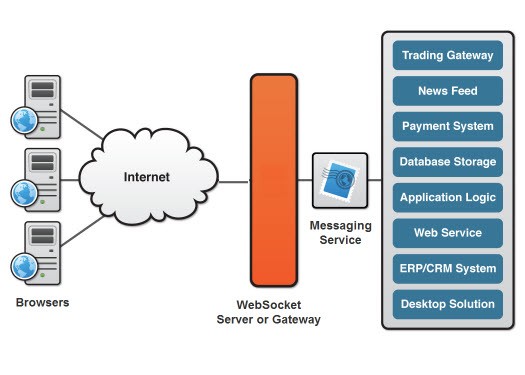
Cet article décrit une jolie application Android développée avec des boutons pour communiquer avec un autre appareil (un ordinateur ou un Raspberry PI) via websocket.
Websocket est un protocole de communication décrit ici : https://en.wikipedia.org/wiki/WebSocket
L’application Android complète est disponible ici : https://gitlab.com/iptv-updated/websocket_easy
Cette application utilise la bibliothèque OkHttp décrite ici :
https://medium.com/@ssaurel/learn-to-use-websockets-on-android-with-okhttp-ba5f00aea988
La mise en page de l’application (créée avec Android Studio) définit les événements nécessaires pour envoyer les messages sur le réseau avec websocket. Les flèches servent à envoyer les commandes “up”, “down”, “left” et “right”, et les autres boutons servent à fournir au serveur des drapeaux et des valeurs. Les boutons “Loop” et “Stop-Loop” servent à activer et désactiver un thread côté serveur.

Ce client peut être testé facilement avec le serveur suivant, développé en python :
https://github.com/Pithikos/python-websocket-server
avant d’exécuter le serveur, il faut modifier le nom d’hôte en 0.0.0.0 (au lieu de 127.0.0.1) pour permettre la communication avec tous les clients du réseau local
voici la vidéo :

le serveur peut aussi se trouver sur un Raspberry PI : c’est possible avec python et la bibliothèque “Tornado”.
Ensuite, un circuit simple a été réalisé sur le Raspberry PI avec des LED et des résistances reliées aux GPIO. Les LED réagissent selon le bouton pressé dans l’application Android.
[embedyt] https://www.youtube.com/watch?v=pxZu40eGSn0[/embedyt]
Code à exécuter sur le Raspberry PI :
import tornado.httpserver
import tornado.ioloop
import tornado.options
import tornado.web
import tornado.websocket
import time
import RPi.GPIO as GPIO
import threading
import subprocess, os
import signal


GPIO.setmode(GPIO.BOARD)
#GPIO.setwarnings(False)
GPIO_sw = 7   #29  # pin 18
GPIO_out = 37
GPIO.setup(GPIO_sw,GPIO.IN,pull_up_down=GPIO.PUD_DOWN)
GPIO.setup(GPIO_out,GPIO.OUT)


#global Dead
#Dead = False
GPIO.setmode(GPIO.BOARD)
GPIO.setup(31, GPIO.OUT)
GPIO.setup(33, GPIO.OUT)
GPIO.setup(35, GPIO.OUT)
GPIO.setup(29, GPIO.OUT)
GPIO.output(31,False)
GPIO.output(33,False)
GPIO.output(35,False)
GPIO.output(29,False)

class LedHandler(tornado.websocket.WebSocketHandler):

    def loop(self):
        global Dead
        while (not Dead):
            #print "Motor On"
            GPIO.output(31,True)
            GPIO.output(33,False)
            GPIO.output(35,False)
	    GPIO.output(29,False)
            time.sleep(0.2)
            GPIO.output(31,False)
            GPIO.output(33,True)
            GPIO.output(35,False)
            GPIO.output(29,False)
            time.sleep(0.2)
            GPIO.output(31,False)
            GPIO.output(33,False)
            GPIO.output(35,True)
	    GPIO.output(29,False)
            time.sleep(0.2)
            GPIO.output(31,False)
            GPIO.output(33,False)
            GPIO.output(35,False)
            GPIO.output(29,True)
            time.sleep(0.2)
	if Dead == True:
	    GPIO.output(29,False)
    def check_origin(self, origin):
            return True

    def open(self):
        global channelValue
        global volumeLevel
        print "Connection opened from: {}".format(self.request.remote_ip)
        self.write_message("Connection opened")

    def on_close(self):
        print "Connection closed"

    def on_message(self, message):
        global Dead
	global volumeLevel
        global channelValue
	global channelAddress
	global run
        global io_loop
        global server

	if run ==1:
        	currentState = GPIO.input(31)
        	print "Message received {}".format(message)
		if (message[0] == "{"):
			indexComma = message.find(":")
			typeVal=message[1:indexComma]
			indexClose = message.find("}")
			value = message[indexComma+1:indexClose]
			#print(typeVal)
			#print(value)
                        if (typeVal == "volume" ):
				volumeLevel = value
				cmd = subprocess.Popen("sudo mpc volume " + str(value), shell=True,stdout=subprocess.PIPE)
                                stations = cmd.stdout.readlines()
			elif (typeVal == "channel" ):
				channelValue = value
                                cmd = subprocess.Popen("sudo mpc play " + str(value), shell=True,stdout=subprocess.PIPE)
                                stations = cmd.stdout.readlines()
				channelAddress = ""
			elif (typeVal == "radio"):
				cmd = subprocess.Popen("sudo mpc clear ", shell=True,stdout=subprocess.PIPE)
                                stations = cmd.stdout.readlines()
				cmd = subprocess.Popen("sudo mpc add " + str(value), shell=True,stdout=subprocess.PIPE)
                                stations = cmd.stdout.readlines()
				cmd = subprocess.Popen("sudo mpc play ", shell=True,stdout=subprocess.PIPE)
                                stations = cmd.stdout.readlines()
				channelAddress = str(value)
		if message == "default":
			cmd = subprocess.Popen("sudo /home/pi/pythonexample/playlist.sh", shell=True,stdout=subprocess.PIPE)
                        stations = cmd.stdout.readlines()
                        cmd = subprocess.Popen("sudo mpc play " + str(channelValue), shell=True,stdout=subprocess.PIPE)
                        stations = cmd.stdout.readlines()

        	elif message == "ledon":
	    		if currentState == True:
                		self.write_message("LED is already OFF")
            		else:
                		GPIO.output(31, True)
                		GPIO.output(33, True)
                		GPIO.output(35, True)
				GPIO.output(29, True)
        	elif message == "ledoff":
            		if currentState == False:
                		self.write_message("LED is already OFF")
            		else:
                		GPIO.output(31, False)
                		GPIO.output(33, False)
                		GPIO.output(35, False)
				GPIO.output(29, False)
        	elif message == "stoploop":
            		Dead = True
        	elif message == "loop":
            		if Dead == True:
	    			Dead = False
            			our_thread = threading.Thread(target=self.loop)
            			our_thread.start()
        	elif message == "ledlefton":
            		GPIO.output(31,False)
            		GPIO.output(35,True)
            		#if channelValue > 1:
			#	channelValue = channelValue - 1
                	#	cmd = subprocess.Popen("sudo mpc play " + str(channelValue), shell=True,stdout=subprocess.PIPE)
                	#	stations = cmd.stdout.readlines()
        	elif message == "ledleftoff":
            		GPIO.output(35, False)
        	elif message == "ledrighton":
            		GPIO.output(35, False)
            		GPIO.output(31,True)
            		#if channelValue < 5:
            		#	channelValue = channelValue + 1
                	#	cmd = subprocess.Popen("sudo mpc play " + str(channelValue), shell=True,stdout=subprocess.PIPE)
                	#	stations = cmd.stdout.readlines()
        	elif message == "ledrightoff":
            		GPIO.output(31, False)
        	elif message == "ledupon":
            		GPIO.output(29, False)
            		GPIO.output(33,True)
	    		#if volumeLevel < 100: # volumeLevel = volumeLevel +10 # cmd = subprocess.Popen("sudo mpc volume " + str(volumeLevel), shell=True,stdout=subprocess.PIPE) # stations = cmd.stdout.readlines() elif message == "ledupoff": GPIO.output(33, False) elif message == "leddownon": GPIO.output(29, True) GPIO.output(33, False) #if volumeLevel > 0:
			#	volumeLevel = volumeLevel-5
                	#	cmd = subprocess.Popen("sudo mpc volume " + str(volumeLevel), shell=True,stdout=subprocess.PIPE)
                	#	stations = cmd.stdout.readlines()
        	elif message == "leddownoff":
            		GPIO.output(29, False)
	if message == "radiooff" and run==1:
		print "  Stopped "
		GPIO.output(GPIO_out,False)
		run = 0
		cmd = subprocess.Popen("sudo mpc stop", shell=True,stdout=subprocess.PIPE)
		stations = cmd.stdout.readlines()
		#server.stop()
		#io_loop.stop()
        elif message == "radioon" and run==0:
        	print "  Started"
        	GPIO.output(GPIO_out,True)
        	cmd = subprocess.Popen("sudo mpc volume "  + str(volumeLevel), shell=True,stdout=subprocess.PIPE)
        	stations = cmd.stdout.readlines()
        	cmd = subprocess.Popen("sudo mpc play "  + str(channelValue), shell=True,stdout=subprocess.PIPE)
        	stations = cmd.stdout.readlines()
        	run = 1
        	#our_thread = threading.Thread(target=socketloop)
        	#our_thread.start()


def socketloop():
	global io_loop
	global server
	try:
		tornado.options.parse_command_line()
		app = tornado.web.Application(handlers=[(r"/", LedHandler)])
        	server = tornado.httpserver.HTTPServer(app)
        	server.listen(8000)
		io_loop = tornado.ioloop.IOLoop.instance()
		io_loop.start()
	except RuntimeError:
		print("server already on")

if __name__ == "__main__":
	global io_loop
	global server
        global volumeLevel
        global channelValue
	global channelAddress
	global run
	global Dead
	volumeLevel=90
	channelAddress = ""
	channelValue=1
	GPIO.output(GPIO_out,True)
        time.sleep(0.5)
        GPIO.output(GPIO_out,False)
        #our_thread = threading.Thread(target=socketloop)
        #our_thread.start()
	Dead = True
	try:
		run = 0
		while True :
			#print GPIO.input(GPIO_sw)
			if GPIO.input(GPIO_sw)==True and run == 0:
         			print channelAddress
				print "  Started"
	 			GPIO.output(GPIO_out,True)
				cmd = subprocess.Popen("sudo /home/pi/pythonexample/playlist.sh", shell=True,stdout=subprocess.PIPE)
                        	stations = cmd.stdout.readlines()
				cmd = subprocess.Popen("sudo mpc volume "  + str(volumeLevel), shell=True,stdout=subprocess.PIPE)
				stations = cmd.stdout.readlines()
				if channelAddress <> "":
					cmd = subprocess.Popen("sudo mpc clear ", shell=True,stdout=subprocess.PIPE)
                                	stations = cmd.stdout.readlines()
                                	cmd = subprocess.Popen("sudo mpc add " + channelAddress, shell=True,stdout=subprocess.PIPE)
                               	 	stations = cmd.stdout.readlines()
					cmd = subprocess.Popen("sudo mpc play", shell=True,stdout=subprocess.PIPE)
					stations = cmd.stdout.readlines()
				else:
					cmd = subprocess.Popen("sudo mpc play "  + str(channelValue), shell=True,stdout=subprocess.PIPE)
                                	stations = cmd.stdout.readlines()
				run = 1
				try:
					server.stop()
                                	io_loop.stop()
				except:
					print "Caught threadWebsocket. Thread was already off"
				our_thread = threading.Thread(target=socketloop)
        			our_thread.start()
				while GPIO.input(GPIO_sw)==True:
					time.sleep(0.1)
			if GPIO.input(GPIO_sw)==True and run == 1:
				print "  Stopped "
				GPIO.output(GPIO_out,False)
				server.stop()
				run = 0
				cmd = subprocess.Popen("sudo mpc stop", shell=True,stdout=subprocess.PIPE)
				stations = cmd.stdout.readlines()
				Dead = True
				GPIO.output(31,False)
				GPIO.output(33,False)
				GPIO.output(35,False)
				GPIO.output(29,False)
				#cmd = subprocess.Popen("sudo ./findkill.sh", shell=True,stdout=subprocess.PIPE)
                                #stations = cmd.stdout.readlines()
				#cmd = subprocess.Popen("chmod 777 ./killall.sh", shell=True,stdout=subprocess.PIPE)
                                #stations = cmd.stdout.readlines()
				#cmd = subprocess.Popen("./killall.sh", shell=True,stdout=subprocess.PIPE)
                                #stations = cmd.stdout.readlines()
				#cmd = subprocess.Popen("rm -f ./killall.sh", shell=True,stdout=subprocess.PIPE)
                                #stations = cmd.stdout.readlines()
				#server.stop()
				#io_loop.stop()
				while GPIO.input(GPIO_sw)==True:
					time.sleep(0.1)
			time.sleep(0.1)

	except KeyboardInterrupt:
		print "  Quit"
		GPIO.cleanup()


Welcome to the page on “websocket_easy: easy comunication between Android App and Computer or Raspeberry PI”. I wrote it for engineering students: if a step does not add up, an exercise gives you a different result or you would like more material on the topic, just ask in the comments and I will reply. A star rating above helps me understand which pages to improve.
[…] websocket_easy: easy comunication between Android App and Computer or Raspeberry PI […]