Structs, linked lists and data structures
Structs and typedef, the arrow operator, linked lists with insertion and traversal, comparison with arrays, stacks, queues, trees and hash tables.
An array holds data of the same type. But often a piece of information is made of different data that belong together: a component has a code, a value, a tolerance and a stock quantity. C’s structs group fields of different types into a single new type. With structs and pointers you build dynamic data structures, the first of which is the linked list. In this lesson we see both, with their pros and cons compared with arrays.
Structs
#include <stdio.h>

struct component {
    char   code[16];
    double value;         /* in ohms, farads or henries */
    double tolerance;     /* in per cent */
    int    quantity;
};

int main(void)
{
    struct component r = {"R-10K", 10e3, 1.0, 250};
    r.quantity -= 10;                                     /* fields are accessed with a dot */
    printf("%s: %.0f ohm +/- %.0f%%, %d pieces\n", r.code, r.value, r.tolerance, r.quantity);
    return 0;
}
With typedef the type gets a shorter name: typedef struct component Component;. Structs can be copied by assignment, passed to functions and put in arrays: Component stock[500]; is a small database.
A large struct passed by value is copied in full. Usually its address is passed instead, and fields are accessed with the arrow operator: p->value is shorthand for (*p).value.
double minimum_value(const Component *c)
{
    return c->value * (1.0 - c->tolerance / 100.0);
}
The linked list
An array has two limits: its size is fixed, and inserting an element in the middle means shifting all the ones after it,  . A linked list solves both: each element (node) holds the data and a pointer to the next node; the last one points to
 NULL.
typedef struct node {
    int value;
    struct node *next;
} Node;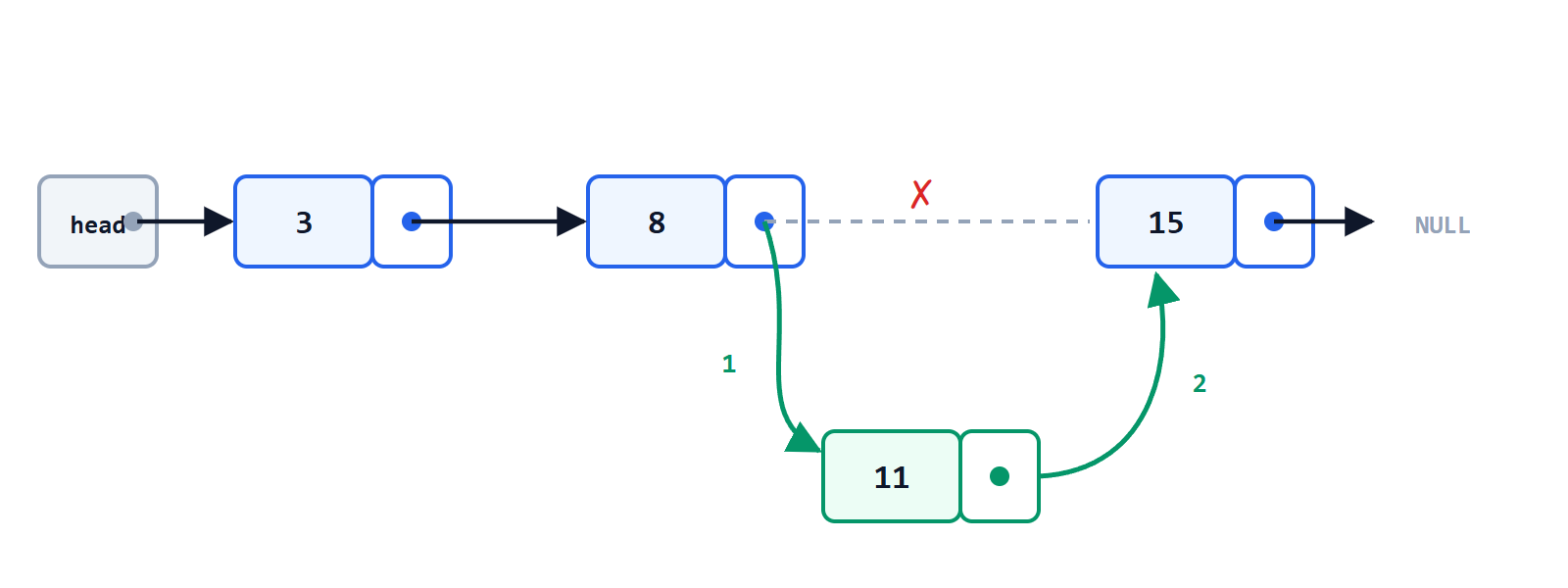
Inserting and traversing
#include <stdlib.h>

/* inserts v after node prev; returns the new node or NULL */
Node *insert_after(Node *prev, int v)
{
    Node *n = malloc(sizeof *n);
    if (n == NULL) return NULL;
    n->value = v;
    n->next = prev->next;      /* 1: the new node points to the next one */
    prev->next = n;            /* 2: the previous one points to the new node */
    return n;
}

void print(const Node *head)
{
    for (const Node *p = head; p != NULL; p = p->next) {
        printf("%d ", p->value);
    }
    printf("\n");
}
The order of the two assignments matters: doing them the other way round loses the reference to the rest of the list. Removing a node is just as quick: the previous one is made to point to the next, and the removed node is released with free.
Array or list?
| Operation | Array | Linked list |
|---|---|---|
| access to the i-th element |  | : must walk |
| insert or remove in the middle (position known) | : shifting | |
| growth | fixed size or reallocation | one node at a time |
| extra memory | none | one pointer per node |
| cache use | excellent, contiguous cells | poor, scattered nodes |
In practice, on modern processors, arrays are often faster even when theory favours lists, precisely because of the cache. Lists are useful when insertions and removals at known positions are frequent, or when elements must stay at the same address.
Stacks, queues and other structures
Arrays and lists are used to build the fundamental data structures:
- stack: the last item in is the first out (LIFO). It is the function call stack, and the one used by a reverse Polish notation calculator.
- queue: the first item in is the first out (FIFO). It is the circular buffer receiving the bytes of a serial port: the receive interrupt puts them in the queue, the main program reads them at its own pace.
- trees: each node has several successors. Binary search trees find an element in
 steps, and file systems organise folders and files as a tree.
 - hash tables: they find an element from its key in average time , computing the position directly with a function of the key. They are Python’s “dictionaries” and JavaScript’s objects.
Choosing the right data structure is half the work of designing a program: as Niklaus Wirth put it, algorithms plus data structures equal programs.