From the Simulink model to ECU code: a digital controller with the Z transform, also in Python
A speed control with a discrete PI in Simulink: discrete-time blocks, difference equations, anti-windup, generated C code, AUTOSAR runnables, MIL, SIL, PIL and HIL testing, and the same control simulated in Python with verified code.
This page shows how a digital controller goes from design to the code running in a microcontroller or in a car’s electronic control unit (ECU), following the workflow used in industry: the model in Simulink, discrete-time blocks based on the Z transform, simulation, automatic generation of C code and testing in several stages. The same control is then rebuilt in Python, with free libraries, and the code is verified. The example is the speed control of an electric motor, but the structure is identical for the idle speed of a combustion engine, turbo boost pressure, cruise control or the torque of a traction motor.
Why the Z transform is the language of ECUs
An ECU does not solve differential equations: at fixed intervals (for example every 10 ms) it reads the sensors, runs a piece of code and updates the outputs. The controller is therefore a discrete-time system, described by a difference equation, and its transfer function is in  (lesson and in-depth study on the Z transform). In Simulink this is visible directly: the blocks of the *Discrete* library (Unit Delay, which is exactly
  , Discrete Transfer Fcn, Discrete-Time Integrator, Discrete PID Controller) all have a *Sample time* parameter and correspond one to one to lines of code. The physical process, on the other hand, stays continuous (*Transfer Fcn*, *Integrator* blocks), and the simulator integrates it with a fine step.
The model
The motor, driven by a voltage  , has speed
  with transfer function
![\[ G(s) = \frac{K_m}{\tau s + 1},\qquad K_m = 20\ \frac{\text{rad/s}}{\text{V}},\quad \tau = 0.5\ \text{s} \]](https://www.electronics-engineering.com/wp-content/ql-cache/quicklatex.com-9eb2e44dd572ae11d9b6db2601dccc98_l3.png "Rendered by QuickLaTeX.com")
and the power driver can deliver at most  V. The controller is a PI running at
  ms.
ms.
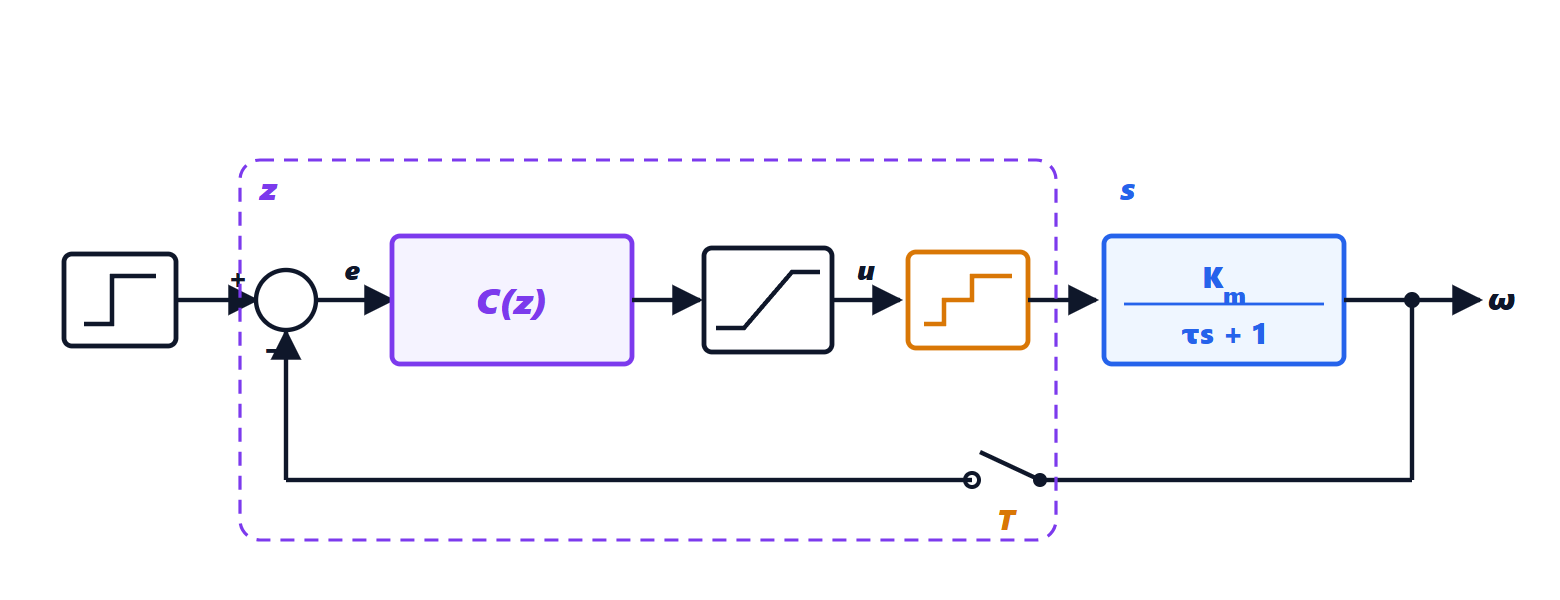
In Simulink the diagram is built like this:
- Step for the reference (0 → 200 rad/s at
 s), Sum with signs
  ;
; - Discrete PID Controller in *Parallel* form,
 ,
,  , *Sample time*
  , *Integrator method* Forward Euler (the default);
 - in the *Output Saturation* tab the limits and, in the *Anti-windup* tab, the *clamping* method;
- Transfer Fcn with numerator
20and denominator[0.5 1]for the motor; - the hold need not be drawn: a discrete block driving a continuous block keeps its output constant between samples, which is exactly the ZOH;
- in the model settings: a fixed-step solver (for example
ode4) with a 1 ms step, or a variable-step one for simulation only. Code generation needs a fixed step, and the controller rate must be a multiple of the base step.
Inside the PI block: difference equations
With forward Euler integration the PI is
![\[ u[k] = K_p\,e[k] + I[k],\qquad I[k + 1] = I[k] + K_iT\,e[k] \]](https://www.electronics-engineering.com/wp-content/ql-cache/quicklatex.com-84fdc18a8e08774a7ba72beec847297a_l3.png "Rendered by QuickLaTeX.com")
i.e., in ,  . The state
  is stored in a Unit Delay: it is the variable that “remembers” the value from the previous step.
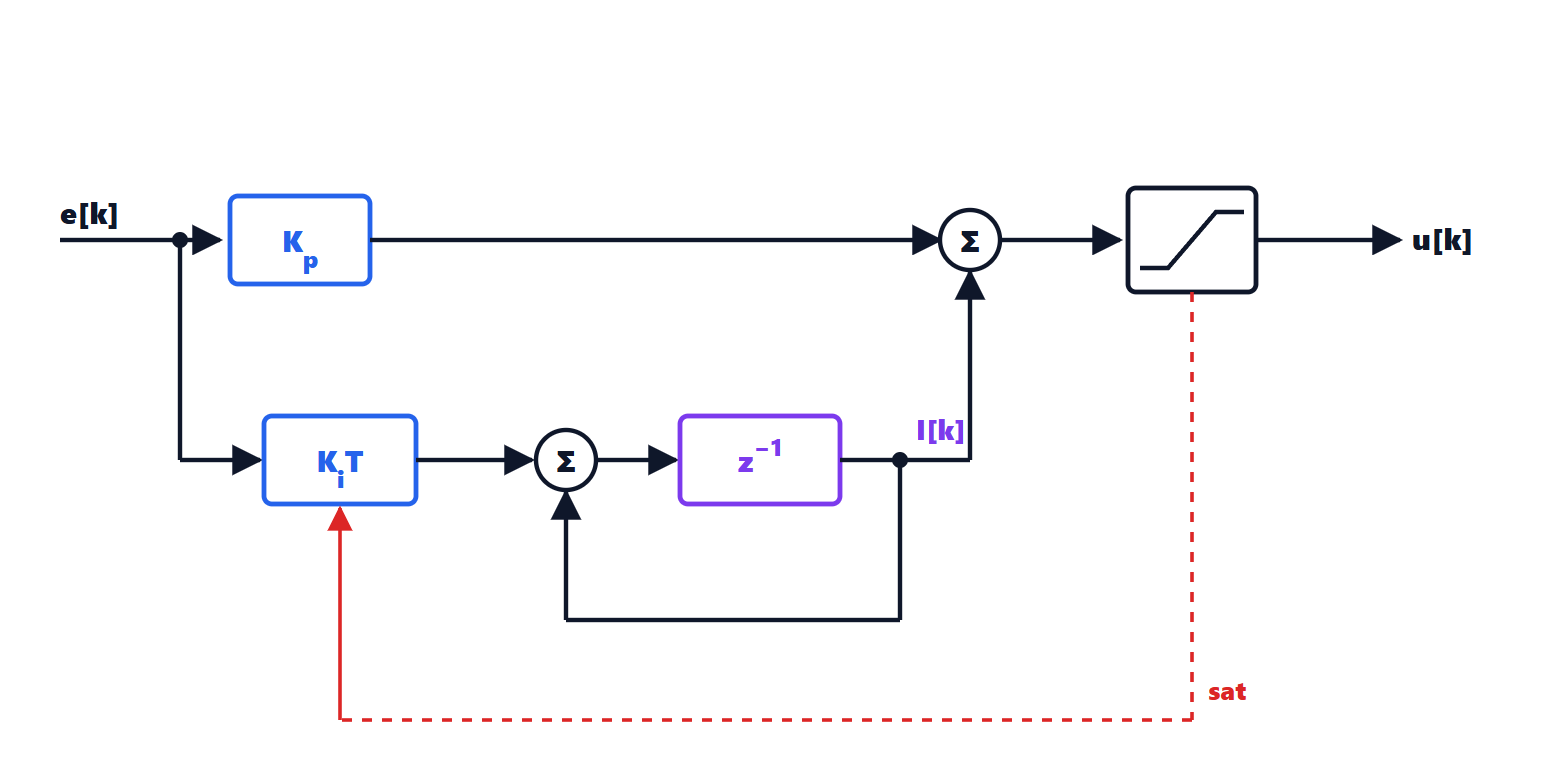
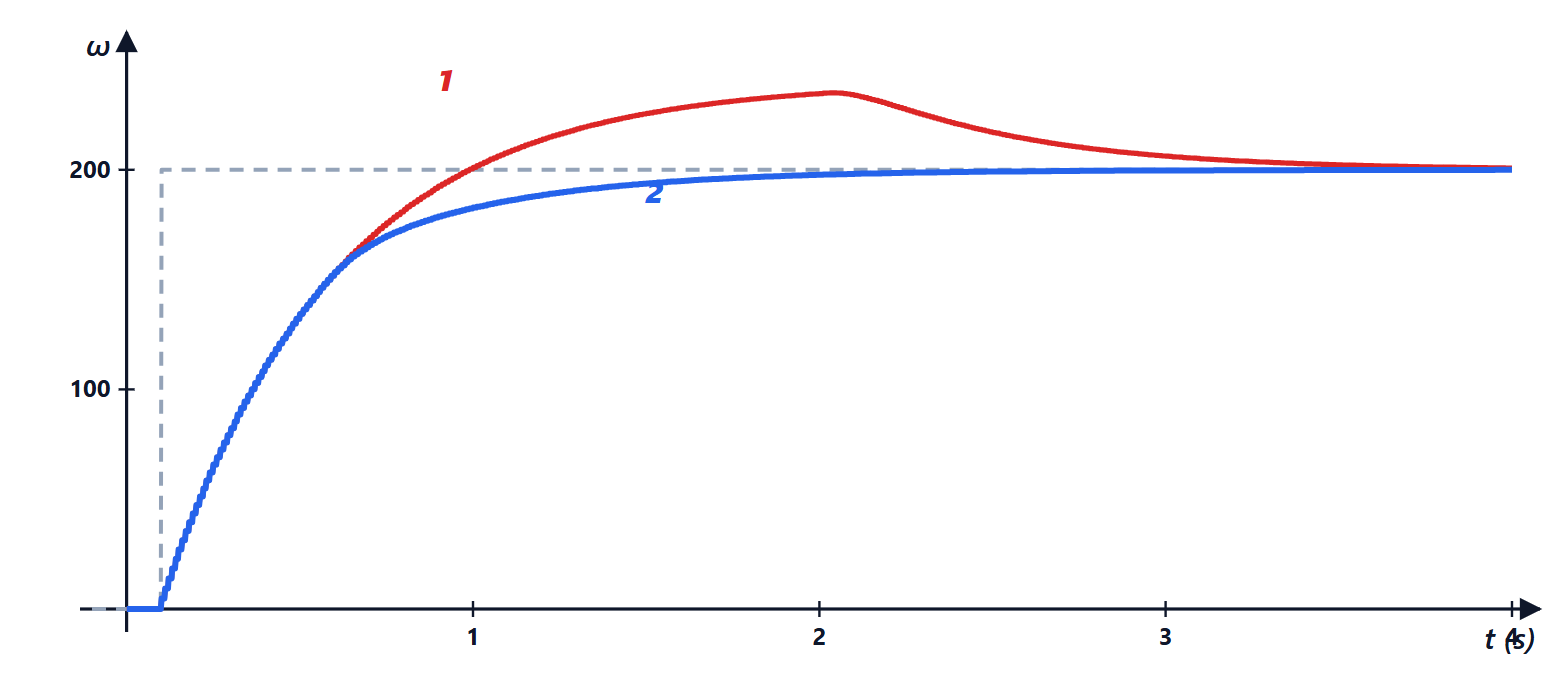
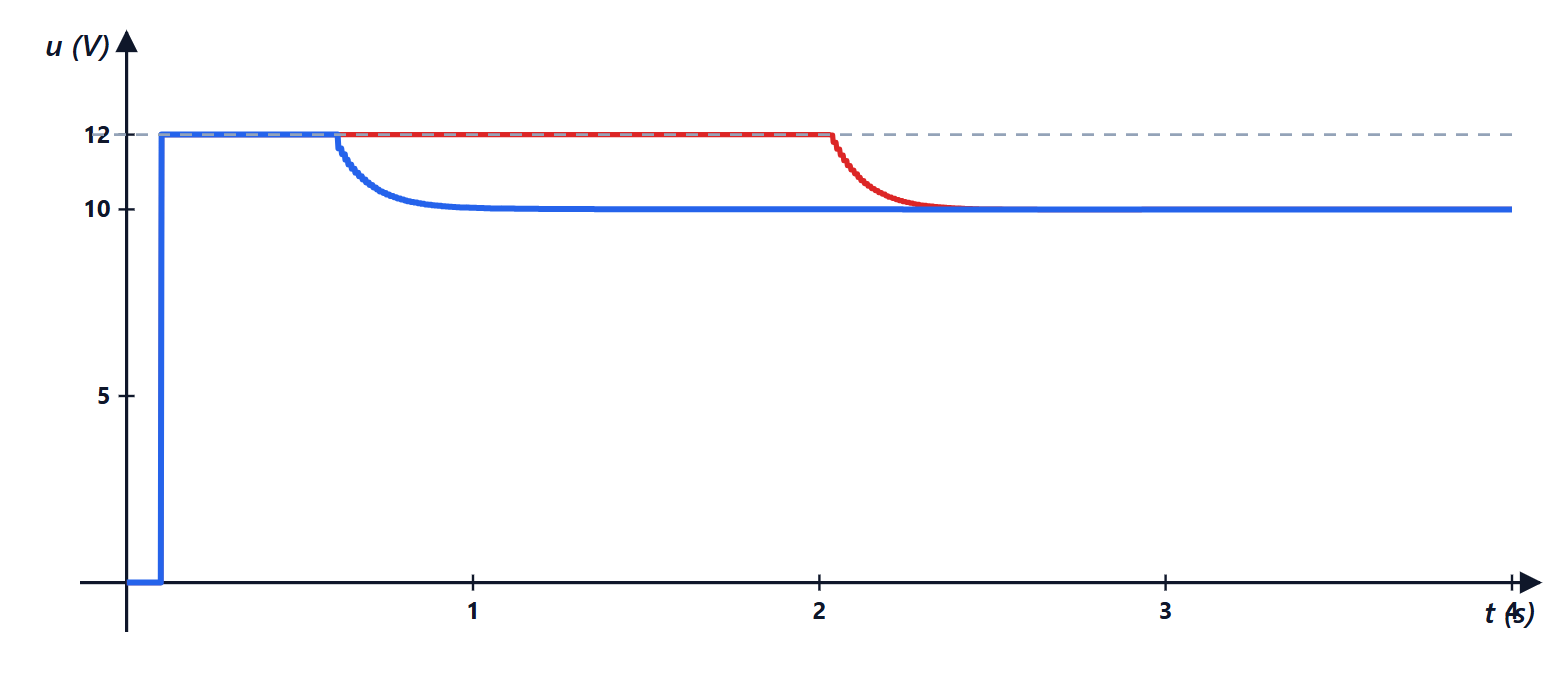
Anti-windup. When the actuator is saturated, the error stays large and the integrator keeps growing: in the end, when the output approaches the reference, the accumulated integral causes a large overshoot. The *clamping* method stops integrating while the output is saturated. In the simulation below, without anti-windup the speed reaches 235 rad/s (17.5 % overshoot) and settles in 3.2 s; with anti-windup it does not exceed 200 rad/s and settles in 1.7 s.
From the model to the code
With Embedded Coder (MathWorks’ code generator for embedded systems) the discrete subsystem becomes C code. The typical structure, simplified, is this:
/* model states (DWork): one for each Unit Delay or integrator */
typedef struct { float I; } DW_motor_ctrl;
static DW_motor_ctrl dw;

void motor_ctrl_initialize(void) { dw.I = 0.0f; }

/* called by the scheduler every 10 ms */
float motor_ctrl_step(float ref, float w)
{
    float e = ref - w;
    float u_lib = 0.25f * e + dw.I;
    float u = u_lib > 12.0f ? 12.0f : (u_lib < -12.0f ? -12.0f : u_lib);
    if (u == u_lib) {                    /* anti-windup: clamping */
        dw.I += 0.5f * 0.01f * e;        /* I[k+1] = I[k] + Ki*T*e[k] */
    }
    return u;
}
The generator also produces an example main program (ert_main.c) in which a function called by a timer, rt_OneStep(), runs model_step() at every period. In an automotive ECU the step function becomes an AUTOSAR runnable assigned to a periodic task of the operating system (for example the 10 ms task), which reads the signals from the CAN bus or the converters and writes the outputs.
Important details in practice:
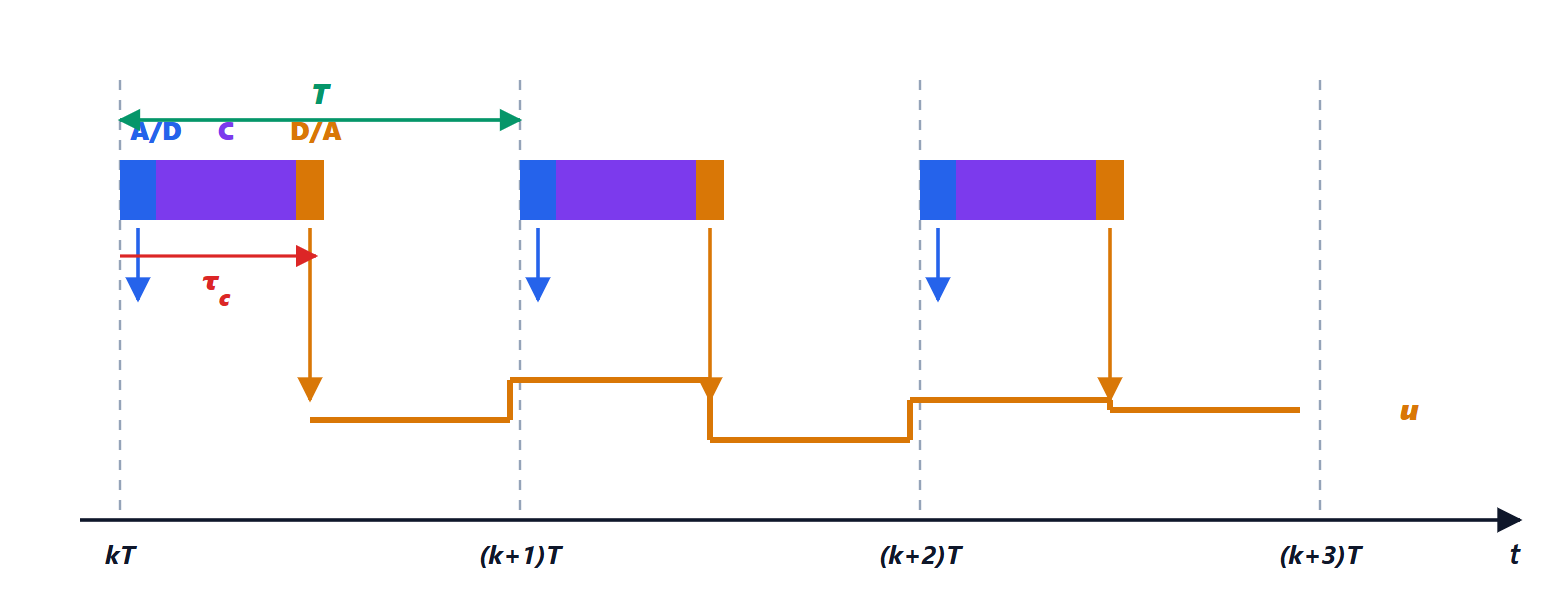
- execution times: reading the A/D, computing and writing the D/A take part of the period; the command is applied with a delay
 that adds to the half sample of the hold and removes phase margin (in-depth study on stability in the z plane);
 - arithmetic: many low-cost ECUs have no floating-point unit, and code is generated in fixed point, with scalings chosen so as not to lose resolution or overflow;
- multiple rates: fast controllers (current, 100 µs) and slow ones (temperature, 100 ms) coexist; *Rate Transition* blocks handle data passing between different tasks;
- functional safety: in automotive the development process follows ISO 26262, which requires traceability between requirements, model, code and tests.
Testing: MIL, SIL, PIL, HIL
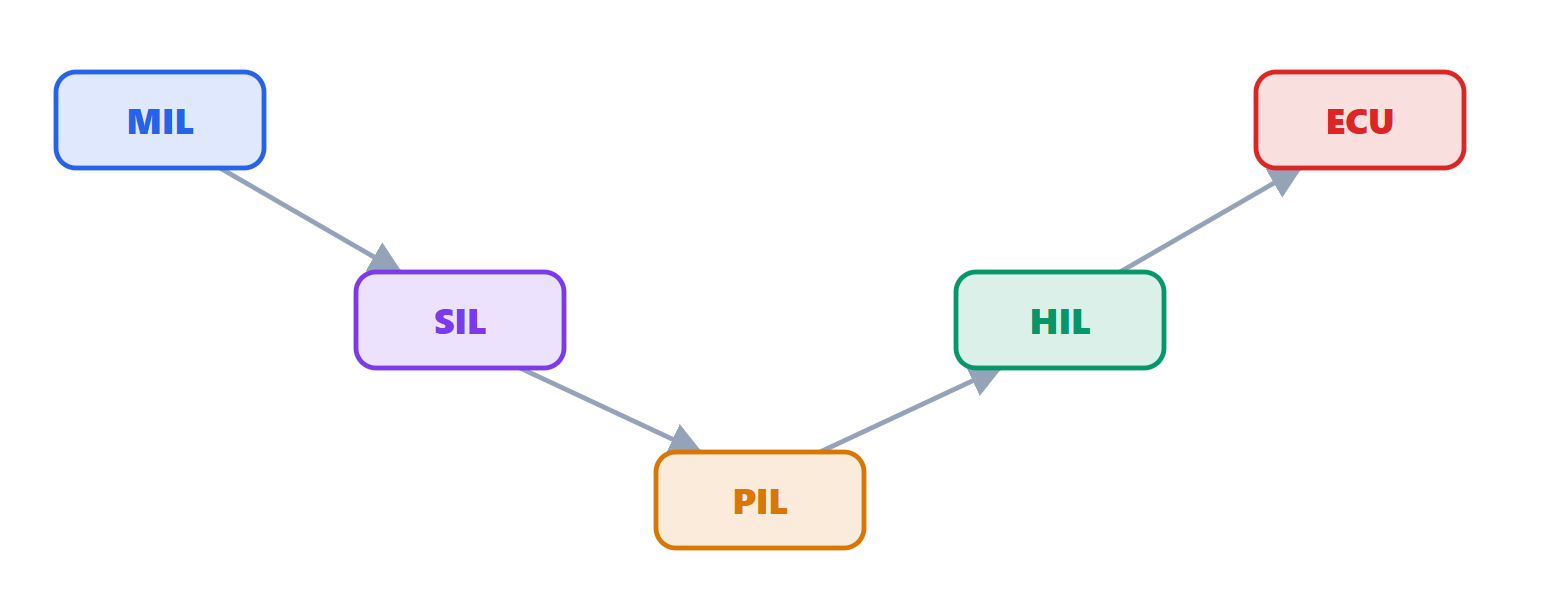
The model is also the reference for verifying the code, in successive stages:
- MIL (*model in the loop*): the complete model, controller and process, is simulated on the PC;
- SIL (*software in the loop*): the generated C code, compiled for the PC, replaces the controller block and the results must match the MIL;
- PIL (*processor in the loop*): the same code runs on the real processor (or a simulator of it), connected to the process model on the PC: execution times and memory are measured;
- HIL (*hardware in the loop*): the complete ECU is connected to a real-time simulator that reproduces the vehicle and the sensors; faults can also be tested, without risk;
- finally the tests on the vehicle.
The same control in Python
Python has no complete equivalent of Simulink, with automatic generation of certifiable code for ECUs. For design and simulation, however, free libraries are enough: numpy and scipy for computation, python-control for transfer functions, matplotlib for plots. The controller loop is written explicitly, sample by sample, and it is exactly the same code that will end up in the microcontroller. The continuous process is simulated with its exact model with hold, ![\omega[k + 1] = a\,\omega[k] + (1 - a)K_m u[k]](https://www.electronics-engineering.com/wp-content/ql-cache/quicklatex.com-7e12b00d69d1223a08c97aaad16c55a0_l3.png "Rendered by QuickLaTeX.com") with
with  (exercise 8 on the Z transform):
import numpy as np

# process: motor, speed w [rad/s] driven by voltage u [V]
Km, tau = 20.0, 0.5          # gain [rad/s/V] and time constant [s]
T = 0.01                     # controller period: 10 ms
a = np.exp(-T / tau)         # exact model with hold (ZOH)

# discrete PI controller (forward Euler integrator, as in Simulink's
# Discrete PID Controller block with default settings)
Kp, Ki = 0.25, 0.5           # [V/(rad/s)], [V/(rad/s)/s]
Umax = 12.0                  # maximum driver voltage

def simulate(antiwindup, t_end=4.0):
    n = int(t_end / T)
    w = 0.0                  # process state
    I = 0.0                  # integrator state (Unit Delay)
    out = []
    for k in range(n):
        t = k * T
        ref = 200.0 if t >= 0.1 else 0.0
        e = ref - w                       # sensor reading and error
        u_free = Kp * e + I               # PI output
        u = min(max(u_free, -Umax), Umax) # saturation
        if not antiwindup or u == u_free: # clamping anti-windup
            I = I + Ki * T * e
        w = a * w + (1 - a) * Km * u      # the motor evolves for one period
        out.append((t, ref, w, u))
    return np.array(out)

for aw in (False, True):
    r = simulate(aw)
    t, w = r[:, 0], r[:, 2]
    outside = np.where(abs(w - 200) > 4)[0]        # samples outside the 2 % band
    print(f"anti-windup={aw}: max {w.max():.1f} rad/s, "
          f"overshoot {max(0.0, 100 * (w.max() - 200) / 200):.1f} %, "
          f"2 % settling at t = {t[outside[-1] + 1]:.2f} s")
Running it prints:
anti-windup=False: max 235.1 rad/s, overshoot 17.5 %, 2 % settling at t = 3.22 s
anti-windup=True: max 200.0 rad/s, overshoot 0.0 %, 2 % settling at t = 1.72 s
and the plots on this page were drawn from exactly these data. For more complex systems, python-control allows continuous and discrete blocks to be connected with ct.interconnect and simulated with ct.input_output_response. Free alternatives to Simulink with a graphical block editor are Xcos (included in Scilab) and OpenModelica; the Python library bdsim allows block diagrams to be described in code.
How the parameters were chosen. The PI zero, at  rad/s, cancels the motor pole at
  rad/s; what remains is a first-order loop
  , with time constant
  s. With ms there are ten samples per time constant: the sampling delay costs about 3° of phase margin, which is negligible (in-depth study on stability in the z plane).
Exercises on stability, root locus and margins of digital systems are on the exercise page linked at the top.