websocket_easy: comunicazione semplice tra app Android e computer o Raspberry PI
Questo articolo descrive una bella app Android sviluppata con dei pulsanti per comunicare con un altro dispositivo (un computer o un Raspberry PI) tramite websocket. Websocket è un protocollo di comunicazione descritto qui…
https://www.electronics-engineering.com/it/websocket_easy-comunicazione-semplice-tra-app-android-e-computer-o-raspberry-pi/
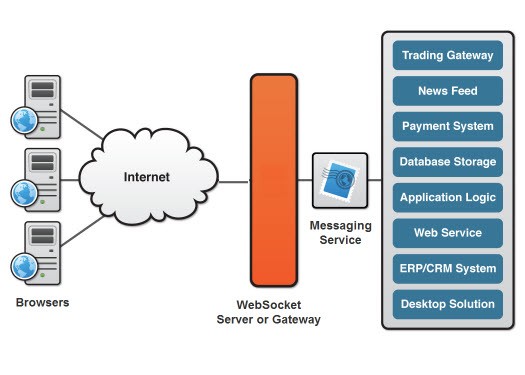
Questo articolo descrive una bella app Android sviluppata con dei pulsanti per comunicare con un altro dispositivo (un computer o un Raspberry PI) tramite websocket.
Websocket è un protocollo di comunicazione descritto qui: https://en.wikipedia.org/wiki/WebSocket
L’app Android completa è disponibile qui: https://gitlab.com/iptv-updated/websocket_easy
Questa app usa la libreria OkHttp descritta qui:
https://medium.com/@ssaurel/learn-to-use-websockets-on-android-with-okhttp-ba5f00aea988
Il layout dell’app (creato con Android Studio) definisce gli eventi necessari per inviare i messaggi in rete con websocket. Le frecce servono a inviare i comandi “up”, “down”, “left” e “right”, mentre gli altri pulsanti servono a fornire al server flag e valori. I pulsanti “Loop” e “Stop-Loop” servono ad attivare e disattivare un thread lato server.

Questo client si può provare facilmente con il seguente server sviluppato in python:
https://github.com/Pithikos/python-websocket-server
prima di eseguire il server bisogna modificare il nome dell’host in 0.0.0.0 (invece di 127.0.0.1) per permettere la comunicazione con tutti i client della rete locale
ecco il video:

il server può trovarsi anche su un Raspberry PI: è possibile usando python con la libreria “Tornado”.
Poi è stato creato su Raspberry PI un circuito semplice con LED e resistenze collegati ai GPIO. I LED reagiscono in base al pulsante premuto nell’app Android.
[embedyt] https://www.youtube.com/watch?v=pxZu40eGSn0[/embedyt]
Codice da eseguire sul Raspberry PI:
import tornado.httpserver
import tornado.ioloop
import tornado.options
import tornado.web
import tornado.websocket
import time
import RPi.GPIO as GPIO
import threading
import subprocess, os
import signal


GPIO.setmode(GPIO.BOARD)
#GPIO.setwarnings(False)
GPIO_sw = 7   #29  # pin 18
GPIO_out = 37
GPIO.setup(GPIO_sw,GPIO.IN,pull_up_down=GPIO.PUD_DOWN)
GPIO.setup(GPIO_out,GPIO.OUT)


#global Dead
#Dead = False
GPIO.setmode(GPIO.BOARD)
GPIO.setup(31, GPIO.OUT)
GPIO.setup(33, GPIO.OUT)
GPIO.setup(35, GPIO.OUT)
GPIO.setup(29, GPIO.OUT)
GPIO.output(31,False)
GPIO.output(33,False)
GPIO.output(35,False)
GPIO.output(29,False)

class LedHandler(tornado.websocket.WebSocketHandler):

    def loop(self):
        global Dead
        while (not Dead):
            #print "Motor On"
            GPIO.output(31,True)
            GPIO.output(33,False)
            GPIO.output(35,False)
	    GPIO.output(29,False)
            time.sleep(0.2)
            GPIO.output(31,False)
            GPIO.output(33,True)
            GPIO.output(35,False)
            GPIO.output(29,False)
            time.sleep(0.2)
            GPIO.output(31,False)
            GPIO.output(33,False)
            GPIO.output(35,True)
	    GPIO.output(29,False)
            time.sleep(0.2)
            GPIO.output(31,False)
            GPIO.output(33,False)
            GPIO.output(35,False)
            GPIO.output(29,True)
            time.sleep(0.2)
	if Dead == True:
	    GPIO.output(29,False)
    def check_origin(self, origin):
            return True

    def open(self):
        global channelValue
        global volumeLevel
        print "Connection opened from: {}".format(self.request.remote_ip)
        self.write_message("Connection opened")

    def on_close(self):
        print "Connection closed"

    def on_message(self, message):
        global Dead
	global volumeLevel
        global channelValue
	global channelAddress
	global run
        global io_loop
        global server

	if run ==1:
        	currentState = GPIO.input(31)
        	print "Message received {}".format(message)
		if (message[0] == "{"):
			indexComma = message.find(":")
			typeVal=message[1:indexComma]
			indexClose = message.find("}")
			value = message[indexComma+1:indexClose]
			#print(typeVal)
			#print(value)
                        if (typeVal == "volume" ):
				volumeLevel = value
				cmd = subprocess.Popen("sudo mpc volume " + str(value), shell=True,stdout=subprocess.PIPE)
                                stations = cmd.stdout.readlines()
			elif (typeVal == "channel" ):
				channelValue = value
                                cmd = subprocess.Popen("sudo mpc play " + str(value), shell=True,stdout=subprocess.PIPE)
                                stations = cmd.stdout.readlines()
				channelAddress = ""
			elif (typeVal == "radio"):
				cmd = subprocess.Popen("sudo mpc clear ", shell=True,stdout=subprocess.PIPE)
                                stations = cmd.stdout.readlines()
				cmd = subprocess.Popen("sudo mpc add " + str(value), shell=True,stdout=subprocess.PIPE)
                                stations = cmd.stdout.readlines()
				cmd = subprocess.Popen("sudo mpc play ", shell=True,stdout=subprocess.PIPE)
                                stations = cmd.stdout.readlines()
				channelAddress = str(value)
		if message == "default":
			cmd = subprocess.Popen("sudo /home/pi/pythonexample/playlist.sh", shell=True,stdout=subprocess.PIPE)
                        stations = cmd.stdout.readlines()
                        cmd = subprocess.Popen("sudo mpc play " + str(channelValue), shell=True,stdout=subprocess.PIPE)
                        stations = cmd.stdout.readlines()

        	elif message == "ledon":
	    		if currentState == True:
                		self.write_message("LED is already OFF")
            		else:
                		GPIO.output(31, True)
                		GPIO.output(33, True)
                		GPIO.output(35, True)
				GPIO.output(29, True)
        	elif message == "ledoff":
            		if currentState == False:
                		self.write_message("LED is already OFF")
            		else:
                		GPIO.output(31, False)
                		GPIO.output(33, False)
                		GPIO.output(35, False)
				GPIO.output(29, False)
        	elif message == "stoploop":
            		Dead = True
        	elif message == "loop":
            		if Dead == True:
	    			Dead = False
            			our_thread = threading.Thread(target=self.loop)
            			our_thread.start()
        	elif message == "ledlefton":
            		GPIO.output(31,False)
            		GPIO.output(35,True)
            		#if channelValue > 1:
			#	channelValue = channelValue - 1
                	#	cmd = subprocess.Popen("sudo mpc play " + str(channelValue), shell=True,stdout=subprocess.PIPE)
                	#	stations = cmd.stdout.readlines()
        	elif message == "ledleftoff":
            		GPIO.output(35, False)
        	elif message == "ledrighton":
            		GPIO.output(35, False)
            		GPIO.output(31,True)
            		#if channelValue < 5:
            		#	channelValue = channelValue + 1
                	#	cmd = subprocess.Popen("sudo mpc play " + str(channelValue), shell=True,stdout=subprocess.PIPE)
                	#	stations = cmd.stdout.readlines()
        	elif message == "ledrightoff":
            		GPIO.output(31, False)
        	elif message == "ledupon":
            		GPIO.output(29, False)
            		GPIO.output(33,True)
	    		#if volumeLevel < 100: # volumeLevel = volumeLevel +10 # cmd = subprocess.Popen("sudo mpc volume " + str(volumeLevel), shell=True,stdout=subprocess.PIPE) # stations = cmd.stdout.readlines() elif message == "ledupoff": GPIO.output(33, False) elif message == "leddownon": GPIO.output(29, True) GPIO.output(33, False) #if volumeLevel > 0:
			#	volumeLevel = volumeLevel-5
                	#	cmd = subprocess.Popen("sudo mpc volume " + str(volumeLevel), shell=True,stdout=subprocess.PIPE)
                	#	stations = cmd.stdout.readlines()
        	elif message == "leddownoff":
            		GPIO.output(29, False)
	if message == "radiooff" and run==1:
		print "  Stopped "
		GPIO.output(GPIO_out,False)
		run = 0
		cmd = subprocess.Popen("sudo mpc stop", shell=True,stdout=subprocess.PIPE)
		stations = cmd.stdout.readlines()
		#server.stop()
		#io_loop.stop()
        elif message == "radioon" and run==0:
        	print "  Started"
        	GPIO.output(GPIO_out,True)
        	cmd = subprocess.Popen("sudo mpc volume "  + str(volumeLevel), shell=True,stdout=subprocess.PIPE)
        	stations = cmd.stdout.readlines()
        	cmd = subprocess.Popen("sudo mpc play "  + str(channelValue), shell=True,stdout=subprocess.PIPE)
        	stations = cmd.stdout.readlines()
        	run = 1
        	#our_thread = threading.Thread(target=socketloop)
        	#our_thread.start()


def socketloop():
	global io_loop
	global server
	try:
		tornado.options.parse_command_line()
		app = tornado.web.Application(handlers=[(r"/", LedHandler)])
        	server = tornado.httpserver.HTTPServer(app)
        	server.listen(8000)
		io_loop = tornado.ioloop.IOLoop.instance()
		io_loop.start()
	except RuntimeError:
		print("server already on")

if __name__ == "__main__":
	global io_loop
	global server
        global volumeLevel
        global channelValue
	global channelAddress
	global run
	global Dead
	volumeLevel=90
	channelAddress = ""
	channelValue=1
	GPIO.output(GPIO_out,True)
        time.sleep(0.5)
        GPIO.output(GPIO_out,False)
        #our_thread = threading.Thread(target=socketloop)
        #our_thread.start()
	Dead = True
	try:
		run = 0
		while True :
			#print GPIO.input(GPIO_sw)
			if GPIO.input(GPIO_sw)==True and run == 0:
         			print channelAddress
				print "  Started"
	 			GPIO.output(GPIO_out,True)
				cmd = subprocess.Popen("sudo /home/pi/pythonexample/playlist.sh", shell=True,stdout=subprocess.PIPE)
                        	stations = cmd.stdout.readlines()
				cmd = subprocess.Popen("sudo mpc volume "  + str(volumeLevel), shell=True,stdout=subprocess.PIPE)
				stations = cmd.stdout.readlines()
				if channelAddress <> "":
					cmd = subprocess.Popen("sudo mpc clear ", shell=True,stdout=subprocess.PIPE)
                                	stations = cmd.stdout.readlines()
                                	cmd = subprocess.Popen("sudo mpc add " + channelAddress, shell=True,stdout=subprocess.PIPE)
                               	 	stations = cmd.stdout.readlines()
					cmd = subprocess.Popen("sudo mpc play", shell=True,stdout=subprocess.PIPE)
					stations = cmd.stdout.readlines()
				else:
					cmd = subprocess.Popen("sudo mpc play "  + str(channelValue), shell=True,stdout=subprocess.PIPE)
                                	stations = cmd.stdout.readlines()
				run = 1
				try:
					server.stop()
                                	io_loop.stop()
				except:
					print "Caught threadWebsocket. Thread was already off"
				our_thread = threading.Thread(target=socketloop)
        			our_thread.start()
				while GPIO.input(GPIO_sw)==True:
					time.sleep(0.1)
			if GPIO.input(GPIO_sw)==True and run == 1:
				print "  Stopped "
				GPIO.output(GPIO_out,False)
				server.stop()
				run = 0
				cmd = subprocess.Popen("sudo mpc stop", shell=True,stdout=subprocess.PIPE)
				stations = cmd.stdout.readlines()
				Dead = True
				GPIO.output(31,False)
				GPIO.output(33,False)
				GPIO.output(35,False)
				GPIO.output(29,False)
				#cmd = subprocess.Popen("sudo ./findkill.sh", shell=True,stdout=subprocess.PIPE)
                                #stations = cmd.stdout.readlines()
				#cmd = subprocess.Popen("chmod 777 ./killall.sh", shell=True,stdout=subprocess.PIPE)
                                #stations = cmd.stdout.readlines()
				#cmd = subprocess.Popen("./killall.sh", shell=True,stdout=subprocess.PIPE)
                                #stations = cmd.stdout.readlines()
				#cmd = subprocess.Popen("rm -f ./killall.sh", shell=True,stdout=subprocess.PIPE)
                                #stations = cmd.stdout.readlines()
				#server.stop()
				#io_loop.stop()
				while GPIO.input(GPIO_sw)==True:
					time.sleep(0.1)
			time.sleep(0.1)

	except KeyboardInterrupt:
		print "  Quit"
		GPIO.cleanup()
Welcome to the page on “websocket_easy: easy comunication between Android App and Computer or Raspeberry PI”. I wrote it for engineering students: if a step does not add up, an exercise gives you a different result or you would like more material on the topic, just ask in the comments and I will reply. A star rating above helps me understand which pages to improve.
[…] websocket_easy: easy comunication between Android App and Computer or Raspeberry PI […]