Axonometric projection: isometric, oblique and dimetric
Properties of axonometric views, isometric with the proof of its scale factor, circles and the four-centre oval, oblique, dimetric and planometric views, construction and exploded views.
Orthographic projections are precise but require you to rebuild the part in your head. Axonometric projection does the opposite: it shows the part in a single three-dimensional view that is easy to understand even for non-specialists, while keeping parallelism and readable dimensions. It is the representation used in assembly manuals, catalogues and exploded views.
The principle
The part is projected onto a single plane with parallel rays, choosing a direction inclined to all three main faces. The three axes  of the part become on the sheet three lines at angles other than 90°. Two key properties follow:
- parallel lines stay parallel: a cube becomes a hexagon with edges parallel in sets of three, not a converging figure as in perspective;
- along each axis lengths are measured with a fixed coefficient: dimensions can be laid off directly, multiplied by that axis’s coefficient.
Unlike perspective, an axonometric view does not give a true impression of depth (distant objects do not get smaller), but it lets you measure on the drawing.
Isometric projection
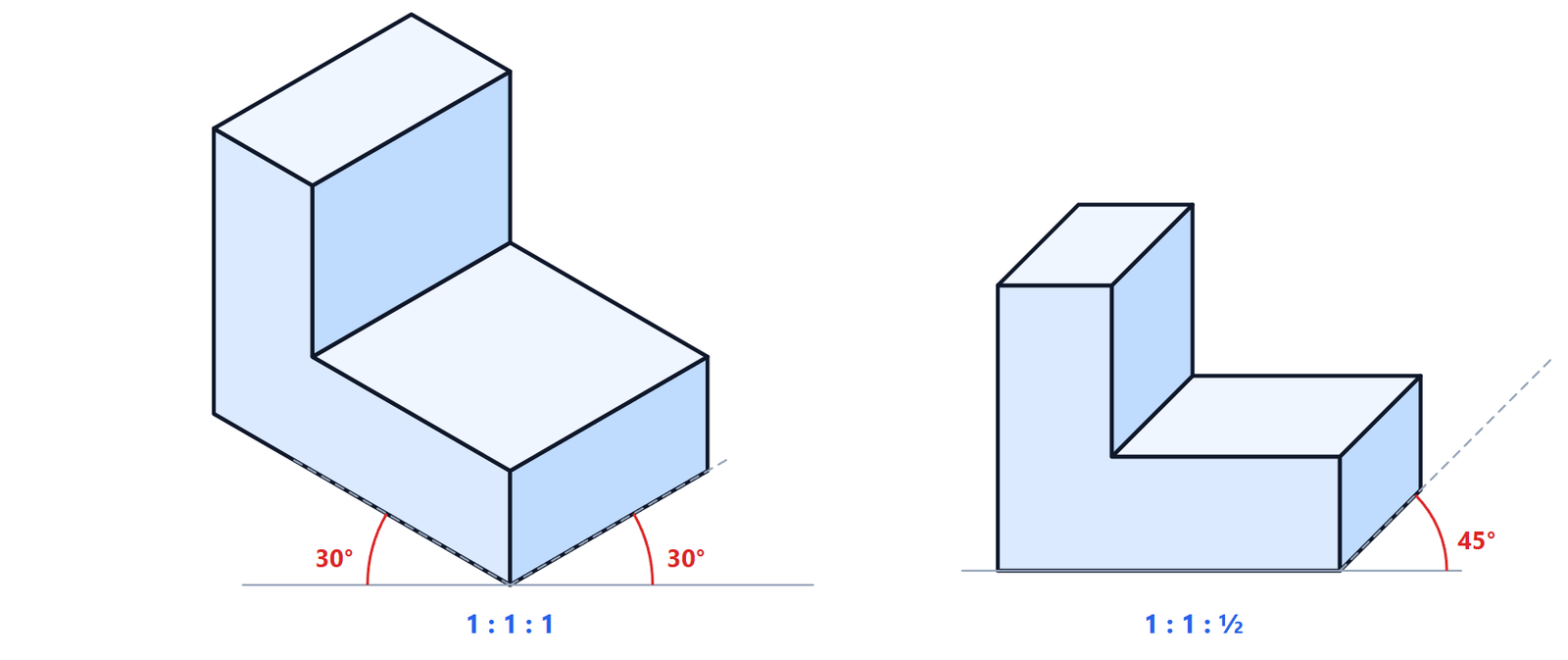
The direction of projection makes the same angle with all three axes. On the sheet the three axes are 120° apart: the  axis vertical, the
  and
and  axes inclined at 30° to the horizontal. The theoretical scale factor is the same on all three axes,
 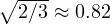 , but in practice 1 is used on all axes (simplified isometric, ISO 5456-3): the drawing comes out about 22% larger, but every dimension is laid off with no calculation.
Why the factor is 
Look at a unit cube along the diagonal  . Each edge makes with the viewing direction an angle
  with
with  (the dot product between
  and the normalised diagonal). The projection of a unit segment is
  . By symmetry the projected axes are 120° apart, so two of them lie at 30° to the horizontal.
Circles in isometric
A circle on a face of the part becomes an ellipse, with its major axis perpendicular to the part axis coming out of that face. By hand it is approximated with the four-centre oval: draw the square around the circle, which in isometric is a rhombus; from the two obtuse-angle corners draw perpendiculars to the opposite sides, which locate the other two centres; the four arcs join at the midpoints of the rhombus sides. In CAD the “isometric ellipse” command does the same automatically.
Oblique projection
Here the front face of the part stays parallel to the sheet and is drawn in true size, exactly as in the front view of orthographic projection. Only depth runs along an inclined axis, usually at 45°. If depth is drawn at full scale (cavalier projection) the object looks too long, so a factor of ½ is often used: this is cabinet projection, the variant in the figure.
It is the quickest method when the important shape is on the front face, perhaps with circles and arcs, which stay circles and are drawn with compasses.
Other axonometric views
- Dimetric: two axes with the same factor and the third different (ISO 5456-3 gives axes at about 7° and 42° with factors 1 and ½). It looks more natural than isometric, because the main face is less distorted.
- Planometric (or military): the plan stays in true size, rotated by 30° or 45°, and heights are vertical. It is used in architecture and town planning, as in the view of the trullo project linked to this subject.
How to build an axonometric view
The safest method starts from the orthographic views:
- draw the axonometric axes and the bounding box of the part, with its maximum width, depth and height;
- “carve” the box by laying off dimensions along the axes, always parallel to the axes;
- draw inclined edges by joining points already found, not by measuring them: their lengths are not to scale;
- go over the visible edges with a wide line; hidden lines are normally left out.
The typical mistake is measuring along a direction that is not parallel to an axis: in an axonometric view only dimensions parallel to the axes are true.
Exploded views and assembly drawings
An exploded view is an axonometric view in which the parts of an assembly are pulled apart along their assembly axes, in the order in which they go together. It is the drawing of instruction manuals and spare parts catalogues, and CAD programs generate it automatically from the 3D model.